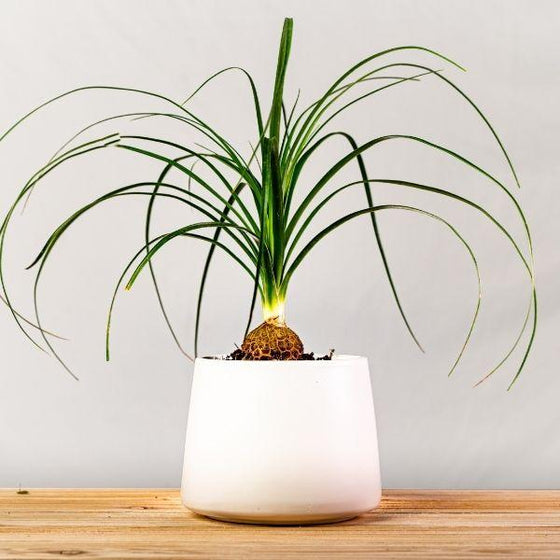
curly palm plant Ponytail Palm
SKU: 62981977956
curly palm plant

curly palm plant Ponytail Palm

Sale price$18.62 Regular price$20.69
Save 10%

Pay in installments of $5.17 with ShopPay, AfterPay and Klarna

Shipping Estimate
USA
  • USA
  • CAN

Ships within 48 hours · Estimated delivery Jul 3 - Jul 8

Promo Codes Available:

For Your Every Summer RSVP, with Code: SUMMER15

Description

curly palm plant Ponytail PalmCurly Ponytail Foliage on a Swollen Trunk Ponytail Palm is one of those plants that makes people smile at first glance. A swollen, bulbous base tapers into a slender trunk, crowned with a fountain of long, ribbon like leaves that spill over the sides like a green ponytail. Despite its common name, it isnt a true palm at all, but a caudex forming succulent native to Mexico, which has evolved to store water in its thick base. The look is part desert

Curly “Ponytail” Foliage on a Swollen Trunk

Ponytail Palm is one of those plants that makes people smile at first glance. A swollen, bulbous base tapers into a slender trunk, crowned with a fountain of long, ribbon-like leaves that spill over the sides like a green ponytail. Despite its common name, it isn’t a true palm at all, but a caudex-forming succulent native to Mexico, which has evolved to store water in its thick base. The look is part desert sculpture, part whimsical houseplant, and it fits just as well on a sunny windowsill as it does styled on a plant stand.

Slow, Compact Growth, and Long-Lived

Indoors, Ponytail Palm is slow-growing, which makes it a fantastic long-term companion plant. Young plants have a single trunk and a tight tuft of foliage, while older specimens gradually thicken their base and may branch into multiple heads over time. In containers inside the home, most plants typically top out at around 3–4 feet tall, although very old specimens in large pots can reach 5–6 feet. Because it grows slowly and stays relatively narrow, it’s easy to tuck into corners, tabletops, or grouped displays without worrying that it will outgrow the space overnight.

Bright Light and Infrequent Watering is all it requires

Think of Ponytail Palm as more of a succulent than a palm when it comes to care. It thrives in bright, indirect light and happily basks in a bit of gentle direct sun, especially morning or late-afternoon rays. A bright east or south window is ideal; in lower light, it will survive, but growth slows dramatically, and the trunk may elongate rather than stay stout. Plant it in a very well-draining mix—such as cactus or succulent soil, or potting mix heavily amended with sand and perlite—so that excess water runs through quickly and never lingers around the roots.

Watering is where Ponytail Palm really earns its “set it and forget it” reputation. The caudex stores water, so you’ll want to let the soil dry out completely between waterings, then soak thoroughly and drain well. In most indoor settings, that means watering every 2–4 weeks, less in low light or winter, and a bit more in bright, warm conditions. It prefers typical household temperatures of around 65–80°F and average humidity, shrugging off dry indoor air that would bother more finicky tropicals. Overwatering is just about the only way to truly get into trouble with this plant—if the base ever feels soft or the leaves pull out easily, it’s a sign the roots have stayed wet too long.

Pet-Safe Personality Plant for Home or Office

In the “indoor landscape,” Ponytail Palm is pure personality. Use it as a quirky focal point on a plant shelf, as a sculptural accent on a low stool, or lined up in multiples for a desert-inspired vignette. It pairs beautifully with cacti, snake plants, and other drought-tolerant houseplants, adding a softer, playful texture to an otherwise spiky or architectural grouping. And because it’s considered non-toxic to cats, dogs, and even horses, you can relax a bit if curious paws can’t resist playing with those tempting, dangling leaves.

Shipping Notes
  • Free Standard Shipping on $100+ Orders to the USA.
  • Except Preorder products are shipped in 48 hours.
  • Delivery to the USA:
  1. Standard Shipping : 3-10 business days
  • If time is of the essence, please consider selecting expedited delivery for faster service.
Exchange/Return Notes
  • We offer a 30-day return/exchange service after receiving.
  • Final sale items are not eligible for returns or exchanges.
  • To process your return/exchange, please contact us at [email protected]
  • Please click here for more details>>> Return & Exchange Policy
SKU: 62981977956

Discover Niche Categories That Outsell curly palm plant

Top-Converting Item to Boost Your Average Order

4.1 ★★★★★
Based on 1642 reviews
Sort
Highest Rating
Newest First
Oldest First
Product Reviews
G
Verified Purchase
Gerdriana Gotopo
Whiting, US
★★★★★ 5
Tinta de sublimation
Encantada. El color queda impreso hermoso
WAS THIS REVIEW HELPFUL?YesReportShare
Reviewed in the United States on November 20, 2025
D
Verified Purchase
Deann montague
San Leandro, US
★★★★★ 4
Missing a black in the box but my favorite ink!
One of my boxes was missing a black but otherwise my favorite ink of all time!
WAS THIS REVIEW HELPFUL?YesReportShare
Reviewed in the United States on November 11, 2025
K
Verified Purchase
Kimmy Gamboa
Boise, US
★★★★★ 5
Tinta para sublimar
Excelente me salió
WAS THIS REVIEW HELPFUL?YesReportShare
Reviewed in the United States on November 2, 2025
S
Verified Purchase
SGT_Clinton
Chelsea, US
★★★★★ 5
Great color saturation
I have only used this a couple of times and was concerned about the dull colors when it printed out. But the listing warns you about that so I went ahead and pressed it. Perfect! Bold colors and high quality images. Plus, filling my printer only took a little over half the bottles. Great value for the money and I will definitely be ordering again.
WAS THIS REVIEW HELPFUL?YesReportShare
Reviewed in the United States on December 28, 2020
L
Verified Purchase
Lourdes L.
Pawtucket, US
★★★★★ 5
Superior Customer Service; 100% prefect and functional, BUT...
Number of Items: 2
This product fits perfectly, after all it's just a simple piece replacement. The big deal is the counter reset, and this is where Customer Service outstands. People complaints about the difficulty of following the reset instructions, and with reason, as they are lengthy. But that is the printer you have, that is Epson's product. You either send the printer to them and pay the premium fee, or do it yourself, but you have to play their game. This is not Seller's fault; on the contrary, Seller put all their effort to include each and every steps you need to fix the problem, no matter what printer model you have. They included most, If not all, printer models you may have. They provided super detailed instructions to ensure your success; keys where needed, no keys where not needed, printer drivers location to download and ensure the resetter will work and, best of all, support if you need it. You have to contact them through Amazon asking for the user's manual (instructions; yes, the lengthy ones), the reset program and the reset keys if applicable (this depends on you printer model; some need the reset keys, some do not). And this is where you get concerned: When are they going to answer, now that my printer is locked? You think (I did): it is weekend, they will probably answer Monday or maybe Tuesday (after all, that already have the money, why care?). Well, I was absolutely wrong, they answered during the weekend with all necessary to have the printer back, up and running; Thank You. Some tips: 1. There is nothing wrong with the software (if got from a reputable source, and they for sure are), so get it without concerns. 2. Get the printer driver as advised; it is quite probable that the software will not work if you don't install the correct driver; don't forget to restart the computer after the driver installation. 3. Make sure your printer is set up with the USB connection Enabled (mine was disabled and that caused a headache: ET-4800). 4. When the resetter instructions call for Initialize the Counters, don't do it, not yet; select Check instead, just above Initialize. If you cannot read (Check) the counters, you will not be able to Initialize them: fix the connection problem first (make sure you installed the printer driver and RESTART the computer, make sure you enabled the USB connection in the printer, and make sure the usb cable is correctly connected). It's not Seller's fault to make long and complicated instructions, that is actually their effort to make sure you have all you need to succeed. Buy with confidence, this works: if you cannot make it work, you may find someone you trust to help you out (your kids or grandkids know a lot for sure), or just let Seller know, they are willing to help you out. Best regards.
WAS THIS REVIEW HELPFUL?YesReportShare
Reviewed in the United States on November 10, 2025

recommand products